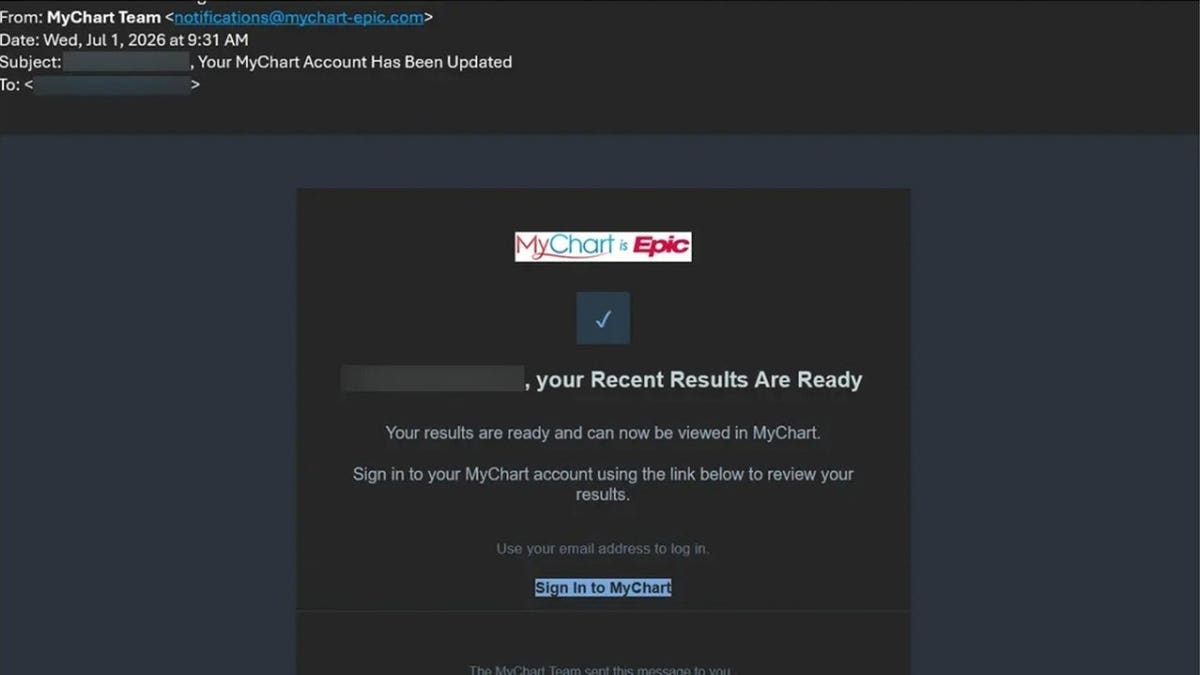
MyChart is a common patient portal provided by Epic Systems Corporation. It allows you to access your health information online, check lab results, and communicate with healthcare providers. As more communication shifts online, patient portals like MyChart become targets for cyber scams. Recently, concerns about scammers targeting MyChart users have emerged. These scams involve phishing campaigns pretending to be MyChart but do not indicate a breach of MyChart itself.
Phishing Scams Exploiting MyChart
MyChart phishing scams use fake emails and offers to exploit trust and obtain sensitive information. Epic has noted several scams mimicking MyChart to capture user credentials and even install malware on Windows computers.
How the Scam Operates
Typically, the scam email appears routine and mimics MyChart branding, instructing you to view “your recent results.” Clicking the link opens a fake sign-in page crafted to resemble the real MyChart site. Once you enter your credentials, attackers can access them. Additionally, after signing in, a bogus medical record appears, sometimes suggesting urgent health patterns detected by AI. This scare tactic pressures you to follow the site’s prompts, including malware installation.
One notorious trick requests Windows users to run specific commands. Following these instructions installs malware on your device, compromising security. Another variant involves a fake “Medicare Health Kit” offer, which, in reality, collects personal and payment information without delivering the promised kit.
Recognizing the Scam
Scammers take advantage of your familiarity with MyChart emails about appointments or test results. A realistic fake alert can appear amidst genuine messages, prompting hurried reactions.
You must exercise caution if an email seems suspicious. Fake MyChart emails might suggest urgent health issues, pressing you to click hastily. However, real critical results should come directly from your care team, not through pop-up alerts.
Preventive Measures
- Access MyChart Independently: Instead of clicking links in emails, open MyChart via the app or official healthcare provider’s website.
- Verify Senders: Review the sender’s entire email address to ensure it matches known addresses from healthcare providers.
- Avoid Running Commands: Never run computer commands from a patient portal. This is a significant warning sign.
- Enable Two-Step Verification: Use two-step verification (2FA) for MyChart as an added protection layer.
- Use Unique Passwords: Utilize a strong, unique password for MyChart, different from other accounts.
- Maintain Updated Security Software: Keep antivirus software active to detect malicious activity.
- Verify Alarming Medical Claims: Directly contact your healthcare provider for confirmation instead of reacting to email prompts.
- Ignore MyChart Giveaways: MyChart does not run giveaways. Treat such emails as scams.
Action Steps if Compromised
If you accidentally engage with a fake MyChart link:
- No input given: Close the page without entering any details. Mark the email as phishing.
- Credentials entered: Access MyChart securely to reset your password and update account details if necessary.
- Credit information provided: Contact your bank to prevent unauthorized use of your card details.
- Malware installed: Disconnect the internet, run a full security scan, and contact professionals to secure the system.
Realize the significance of avoiding rapid responses to scare tactics. Take a moment to verify information independently through trusted channels.
Leave a Reply