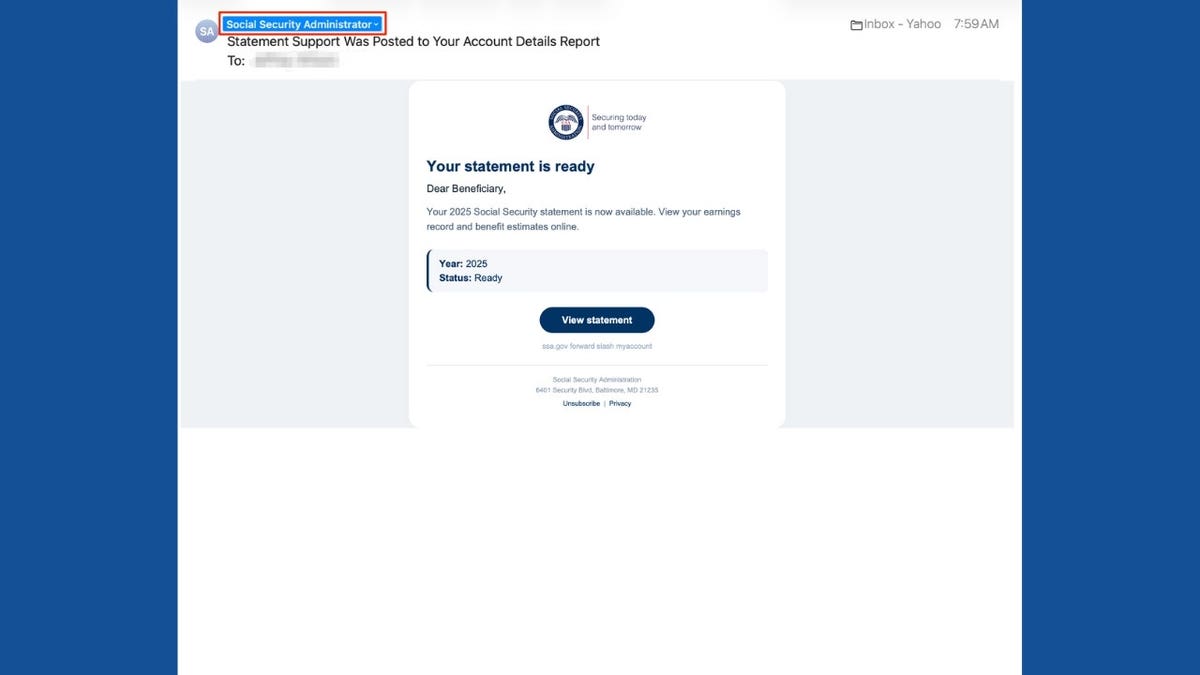
Email scams have become more sophisticated, especially those involving Social Security. A recent phishing attempt highlights the need to be vigilant when checking emails that appear to be from the Social Security Administration (SSA).
Identifying Fake Social Security Emails
Scammers often send emails that seem to be from the SSA, complete with logos and official-looking formats. One recent scam claims to provide details on your Social Security statement for the year 2025. It urges you to click a button to view your statement. The email might look genuine at a glance, but certain elements reveal its true nature.
The scam email arrives with the subject line “Statement Support Was Posted to Your Account Details Report.” It uses the sender’s name “Social Security Administrator” to suggest authenticity. However, the scam is revealed when examining the sender’s email address, which uses a domain unrelated to the SSA, such as loradmiadministraciones.com.
Warnings from Official Agencies
The SSA’s Office of the Inspector General has highlighted a rise in such phishing scams. These emails often trick recipients into providing personal information or downloading malware. Real SSA emails typically come from .gov domains, and any unexpected communication should be verified before taking action.
Why These Scams Are Convincing
The simplicity of these fake emails makes them effective. They do not threaten or pressure recipients. Instead, they play on the desire to access personal information like Social Security statements. The emails appear professional, using official SSA designs and formats.
Steps to Verify Legitimate Social Security Emails
- Check the sender’s email address: Make sure it ends with .gov and is familiar.
- Hover without clicking: Hover over links to see the actual URLs without clicking.
- Direct contact: Visit ssa.gov directly or call the SSA’s official numbers for verification.
How to Safely Access Your Social Security Information
- Access your account through ssa.gov/myaccount
- Use Login.gov or ID.me for secure sign-in
- Complete identity verification processes as required
Preventive Measures Against Phishing Scams
- Be cautious of unexpected statement links and use official SSA channels.
- Strengthen account security with unique passwords and multifactor authentication.
- Utilize antivirus software to detect harmful sites and malware.
- Never share your Social Security number via email.
- Regularly review your Social Security account for unusual activities.
- Limit the personal data accessible to scammers by opting out of data search sites.
- Report suspicious emails to the SSA and delete them after saving necessary details for reporting.
What to Do If You Fall for a Scam
If you interact with a fake email, your response depends on the level of exposure:
- If you simply clicked a link but didn’t provide information, ensure your system is secure by running antivirus checks.
- If your password was entered, change it immediately and check related accounts for unauthorized activity.
- If sensitive information like your Social Security number was compromised, look into identity theft resources and place credit freezes as necessary.
- For any financial details exposed, contact your bank and report to authorities like the FBI and FTC.
Understanding and recognizing these scams can protect you from potential identity theft. Visit ssa.gov for legitimate services and always verify the authenticity of communications regarding sensitive information.
Leave a Reply