Travelers Understand the Challenges
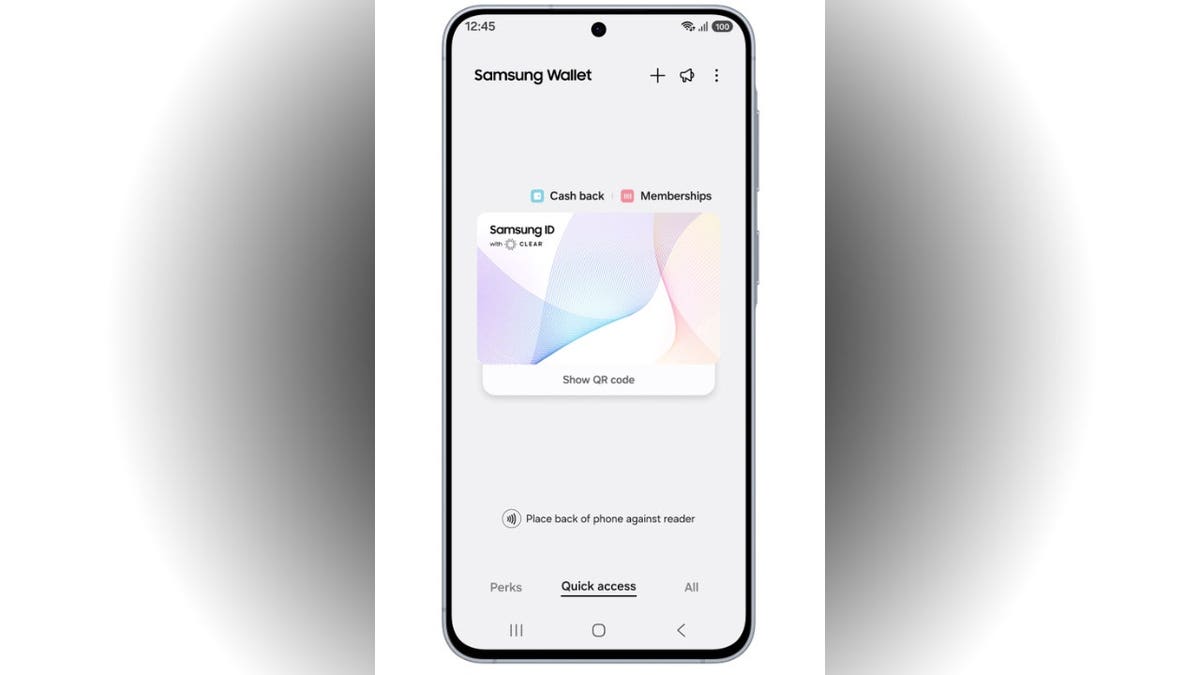
Frequent travelers are all too familiar with the chaos of airport security lines. Samsung aims to ease the burden through a new collaboration with CLEAR, introducing Samsung ID with CLEAR via Samsung Wallet. This service leverages digital IDs tied to a U.S. passport for identification at over 250 TSA checkpoints.
How much of your identity should live inside one app on your phone?
The convenience is undeniable, but security concerns linger.
Apple’s Approach Explained
For iPhone users, Apple has a similar system. Samsung’s offering is unique with the CLEAR integration for identity verification.
Samsung ID with CLEAR
Samsung ID with CLEAR offers a digital ID stored in Samsung Wallet, linked to a U.S. passport verified by CLEAR. This feature allows users to bypass the hassle of retrieving physical documents at TSA checkpoints, though a physical ID is still recommended for full preparedness.
Who Can Access Samsung ID with CLEAR?
Currently, U.S. passport holders can use this service at selected TSA points. Requirement highlights include a Samsung smartphone with Android 9.0+, a Samsung account, and appropriate reader support.
Samsung ID with CLEAR Setup
- Open the Samsung Wallet
- Navigate to Quick Access
- Tap the + button
- Select Digital IDs
- Choose Samsung ID with CLEAR
- Tap Get Card
- Follow the prompts
How It Functions at TSA
After setup, users can present their digital ID at compatible TSA checkpoints with either a tap or QR code. While this digital approach streamlines the process, maintaining a physical passport remains crucial should technology not function as expected.
Extended Use Cases
Beyond airports, Samsung IDs with CLEAR find usage in venues like sporting arenas for identity verification, providing an efficient alternative to traditional methods.
Is Samsung ID with CLEAR Secure?
Fingerprint or PIN access, along with Samsung Knox encryption, safeguards your digital identity. Despite these layers of security, users should remain aware of potential device-related issues and ensure alternate identification means are available.
Safety Enhancements for Using Samsung ID with CLEAR
- Regularly update your phone and apps
- Secure your Samsung account effectively
- Utilize strong authentication methods
Additional advice includes physically retaining your passport for unforeseen circumstances and regularly auditing stored items in Samsung Wallet to prevent clutter.
The Takeaway
Samsung’s innovation promises relief for travelers, yet consideration for both convenience and security is vital as digital IDs enter mainstream use. It’s crucial to weigh the pros and cons of entrusting your phone with such significant responsibilities.
Leave a Reply