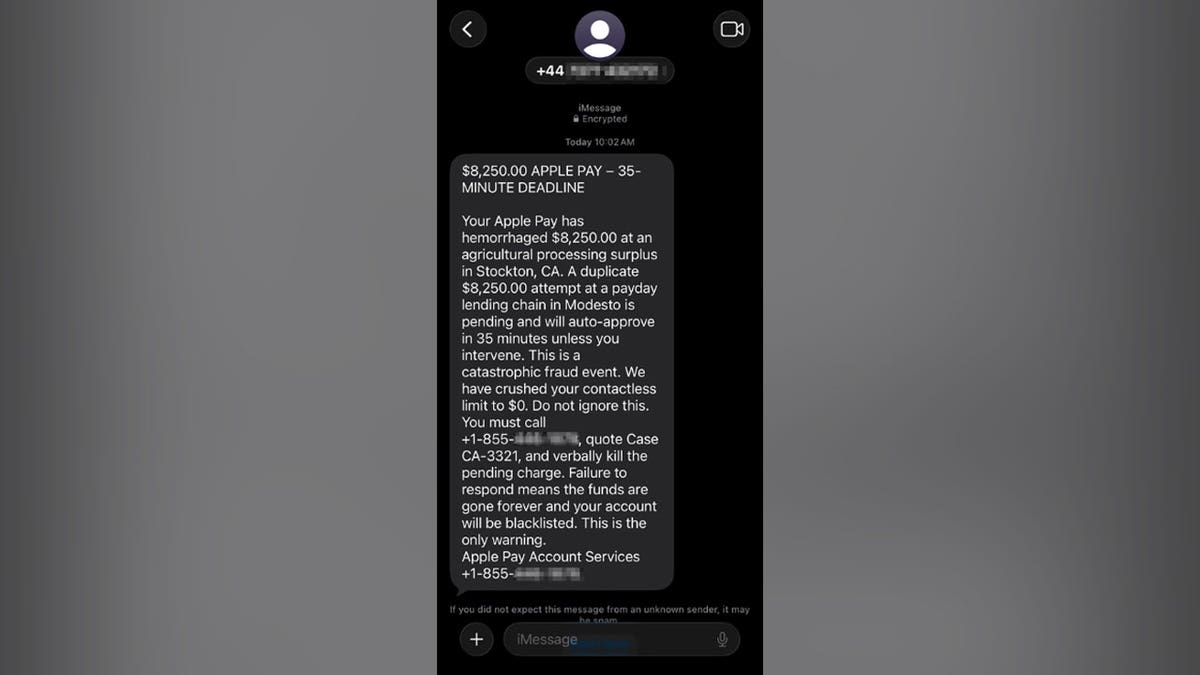
Apple Pay users have recently been targeted by a text scam, causing concern about unauthorized transactions. A resident of Washington D.C., Paul C., received a text falsely warning of an $8,250 charge, with a threat of a similar charge within 35 minutes. This type of deceptive message is designed to induce panic, leading recipients to call unknown numbers.
How Scammers Operate
The fraudulent text claimed the initial transaction occurred at “an agricultural processing surplus in Stockton, CA” and the subsequent one at “a payday lending chain in Modesto.” These descriptions lack specifics about actual merchants, instead using generic terms with real city names in California, which can mislead recipients into believing their legitimacy.
Recognizing These Red Flags:
- The message’s sender and callback numbers differ, raising suspicions about its origin.
- Frequent use of Apple Pay branding aims to create false trust.
- Alarmist wording is intended to generate fear, unlike typical financial alerts.
- Contradictory information suggests it was crafted to confuse and alarm recipients.
- All the provided instructions focus on directing victims to call the scammer.
Victims often face pressure to disclose personal information and follow incorrect procedures, such as installing remote-access apps or transferring money to supposed “safe” accounts. If you identify any of these scam tactics, take immediate action:
How to Verify Suspicious Charges:
- Check your Wallet app for recent transactions.
- Access your bank’s app for detailed account activity.
- Use the phone number on your card for verification, not an unexpected text.
Reporting and Handling Scam Texts:
- Take a screenshot of any suspicious message before deletion.
- Utilize your device’s options to report and block identifying information.
- Email the screenshot to Apple at [email protected].
- Forward the text to 7726 (SPAM) and report to the FTC at ReportFraud.ftc.gov.
Protection Steps:
- Avoid sharing verification codes or remote access.
- Use strong security software to detect threats and protect data.
- Consider data and identity monitoring services for added security.
Paul C.’s experience is a reminder to pause, investigate, and verify through authentic channels whenever faced with unexpected fraud alerts. Taking preventative measures can mitigate the risk of scams and unauthorized transactions.
Leave a Reply